Several motherboards have the necessary hardware for the installation of an infrared transmitter/receiver, requiring only the installation of a module containing the infrared sensor. The great problem, however, is that this module is not easily found in the market and, when it is, its price is high. Our friend Alain Gailland created this module and any user who knows how to use a solder iron can assemble it.
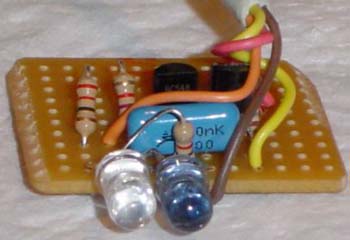
Figure 1: Homemade infrared receiver/transmitter for your PC.
It will cost you barely nothing to assemble this module, and you will be able to make the communication among your PC and other devices that have infrared connection - also called IrDA – such as palmtops, notebooks and cellular phones. But to do so your motherboard has to have this interface. To know whether or not your motherboard has this interface, you should look for a connector called IR, IRCON, SIR, SIRCON or something like that in its manual or in the motherboard itself. This connector usually has 4 or 5 pins and you will need the manual to know the meaning of each pin (+5V, GND, TX and RX), because the function of each pin will vary depending on the motherboard model.
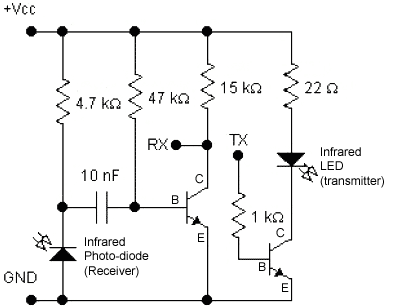
You will have to buy an infrared LED, an infrared photo-diode, two BC548 transistors (when its seen frontally and with the terminals down, its pinning is collector, base and emitter), a 10 nF capacitor, a 4K7 resistor, a 47 K resistor, a 15K resistor, a 22 ohm resistor and a 1 K resistor (all of them 1/8 W). Be careful not to take the LED for the photo-diode and vice-versa as they are very similar. When buying the parts ask the salesperson to identify them for you. Also ask the salesperson to identify the resistors, in case you don't know how to read their color codes.
Figure 2: Infrared device schematics.
When assembling the circuit, the only special care you will need is to make the transmitter (LED) and receiver (photo-diode) become perfectly aligned, side by side, as shown in the picture of the assembled circuit.
After assembling the circuit, you will have to connect it to the motherboard IR connector. Notice that we have marked four points in the circuit: Vcc, Gnd, TX and RX. These points should be connected to the corresponding points in the motherboard IR connector.
It is also important that you configure the IR interface to operate in full-duplex mode at the motherboard setup to achieve higher performance.
After the device is connected, it should be automatically recognized by Windows, and it will show an infrared icon on the task bar near the clock (lower right corner). As soon as you approach your cellphone, handheld or notebook infrared sensor to the device you build, Windows will alert you that it found another computer nearby, allowing you to transfer files between the device and your PC.
Notebook Online Store Supplies notebook parts and accessories for all major brands. Offers competitive prices on reliable original and third-party products.
Best deals on Desktop PCs only @ TigerDirect.com We have what you are looking for in stock& ready to ship at a great price! Computers, Notebooks, Monitors, Digital Cameras, CPU's, Memory, Motherboards, Barebone kits, Networking, Video,& more at the best values. Order today, ships today!
Air Purifier Systems Wide Selection of Industrial Air Purifiers strong enough for your commercial needs. Remove Dust& Pollen, Odors, Gases, Molds, Large& small particles, Chemical& toxic fumes, Bacteria& Viral microorganisms. Compare and Save
Enjoy Media Center Today! Movies HDTV Music Games& more Deluxe& Powerful Media Servers Experience the future of Home Theater Buy online! Shipping to USA& Canada Clearance Sale on now! Until Jan-31
Save Big On IBM Certified Used Equipment IBM Quality at a fraction of the price of new! IBM Certified Used Equipment provides access to a broad selection of used IBM systems, upgrades and features, including newer equipment. All systems are factory-refurbished with a 3-month guarantee.