| |
|
 |
DISCLAIMER |
|
|
This
article is intended for IT Professionals and
systems administrators with legitimate corporate
licenses for Windows XP Professional. It is not intended for home
users, hackers, or computer thieves attempting
to crack the product ID on a pirated version of
the Operating System. Please do
not attempt any of these procedures if you are
unfamiliar with modifying the Windows XP
registry, and please
use this information responsibly. LabMice.net is
not responsible for the use or misuse of this
material, including loss of data, damage to
hardware, or personal injury. INFORMATION
PROVIDED IN THIS DOCUMENT IS PROVIDED
'AS IS' WITHOUT WARRANTY OF ANY KIND,
EITHER EXPRESS OR IMPLIED, INCLUDING BUT
NOT LIMITED TO THE IMPLIED WARRANTIES OF
MERCHANTABILITY, FITNESS FOR A
PARTICULAR PURPOSE AND FREEDOM FROM
INFRINGEMENT. The user assumes the
entire risk as to the accuracy and the
use of this document. |
|
Checking
the Product ID
During the installation of Windows XP Professional, you
are prompted to enter a 25 digit Windows XP Product Key,
which Windows XP promptly converts it into the system's product
ID. Because of
security concerns about piracy, Microsoft does not
provide a tool that allows you to view the Product Key
(or CD Key) that was used to install the operating
system. However, Windows XP Service Pack 1 ships with a list of the two
product IDs that are created by the pirated product volume
license product keys. (The
Product ID can be found by right clicking My
Computer and choosing Properties) To determine eligibility
for the update, Service Pack 1 compares the Windows XP
product ID on the system to this list. The comparison and
the list reside locally on the users PC and no information
is sent to Microsoft as part of this process. Service Pack
1 for Windows XP will fail to install on installations of
Windows with one of the following product IDs:
XXXXX-640-0000356-23XXX and XXXXX-640-2001765-23XXX
The following message will be displayed
if installation fails for this reason:
| Service Pack 1 Setup Error The
product key used to install Windows is invalid. Please
contact your system administrator or retailer immediately
to obtain a valid product key. You may also contact
Microsoft Corporation©s Anti-Piracy Team by emailing
piracy@microsoft.com if you think you have purchased
pirated Microsoft software. Please be assured that any
personal information you send to the Microsoft Anti-Piracy
team will be kept in strict confidence. |
How
to change your Product ID in Windows XP
If the product ID matches the invalid keys above, you may need to
change the
key (re-enter a valid key) in order to install Windows XP service pack 1, and to
make sure your environment is legal. You could completely re-install
Windows XP Professional or you can try the method below. (Please backup
your system before attempting this.) This
workaround is only for the corporate editions of
Windows XP Professional using a compromised or
illegitimate key. Windows XP Home Edition and retail
versions of XP Professional are not affected
by Service Pack 1. Although this procedure may work
with other versions of XP, we have only
tested it on the corporate edition (volume license
version) of Windows XP Professional.
|
|
>>>>>>
WARNING
<<<<<<
This article contains information about
modifying the registry. Before you modify
the registry, make sure to back it up and
make sure that you understand how to
restore the registry if a problem occurs. |
|
|
Backup your
Registry/System State
- Backup your
system state by clicking Start > Run
> and typing ntbackup > Click the
Advanced Mode button in the Backup
Utility Wizard. >Click the Backup
tab, then in Click to select the check box
for any drive, folder, or file that you want
to back up, select the System State.
- As an
alternative, you can backup just the Registry
by clicking Start
> Run > and type in Regedit
From within the Regedit screen, right click My
Computer, choose Export, name the
file whatever you choose, and click Save
To
change the product ID
- Log in as the
local Administrator
- Click Start
> Run > and type in Regedit
- Browse to HKEY_LOCAL_MACHINE\Software\Microsoft\Windows
NT\CurrentVersion\wpaevents
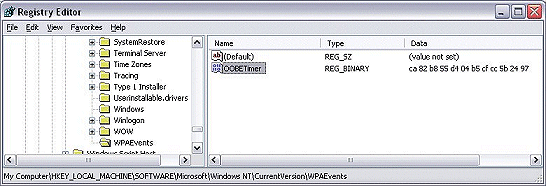
- In the right
pane, right-click OOBETimer,
and then click Modify
- Change at least
one digit of this value to deactivate Windows
- Click OK
and close regedit
- Click Start >
Run and type in: "%systemroot%\system32\oobe\msoobe.exe /a"
- Click Yes,
I want to telephone a customer service
representative to activate Windows,
and then click Next
- Click Change
Product Key (at the bottom)
- Enter your valid
Corporate Product Key
- Press Update and close the window.
- If you are
returned to the previous window, click Remind
me later
- Restart your computer
Verify the
change
- After the
workstation restarts, click Start > Run
- Type in: "%systemroot%\system32\oobe\msoobe.exe /a"
without the quotes.
- Make sure the
dialog box says 'your copy of windows is already
activated'
If you performed
the above steps incorrectly, or used an invalid
key, your system may not be able to boot. Use the
F8 key to boot to the last known good
configuration and retry with a valid key. Troubleshooting
If you tried the above steps and nothing happens:
- Make sure you
are logged in with the local administrator
account, not just an account with
Administrator privileges.
- Try replacing
the %systemroot% variable with the actual
drive letter that your actual directory path,
especially when dual booting, or if the system
path is on a drive other than C:\
- On a normal
Windows XP installation, your systemroot should be
C:\windows\
so the command should be C:\Windows\system32\oobe\msoobe.exe /a
- On systems
upgraded from Windows NT/2000, the systemroot
directory may
be C:\Winnt\
so the command should be C:\winnt\system32\oobe\msoobe.exe /a
- Make sure you
include a space between .exe and /a in
the command:
- Correct
- C:\winnt\system32\oobe\msoobe.exe /a
- Incorrect
- C:\winnt\system32\oobe\msoobe.exe/a
- Product keys for
XP Home Edition and retail versions of XP
Professional will not activate a corporate or
OEM version of XP Professional. The algorithms
are different.
- If you do not
have a valid installation key for Windows XP, DO
NOT e-mail us asking for a key, keygen or
crack.
|
|
|




